Free during beta
Know what your browser extensions just changed.
Extensions update silently, and a trusted one can turn harmful overnight. ExtWarden checks every update, explains it in plain English, and turns off the risky ones before they can do harm.
No account needed. Your extension list never leaves your browser.
 1
How it works
A second pair of eyes on every update.
- 1
Every update is watched
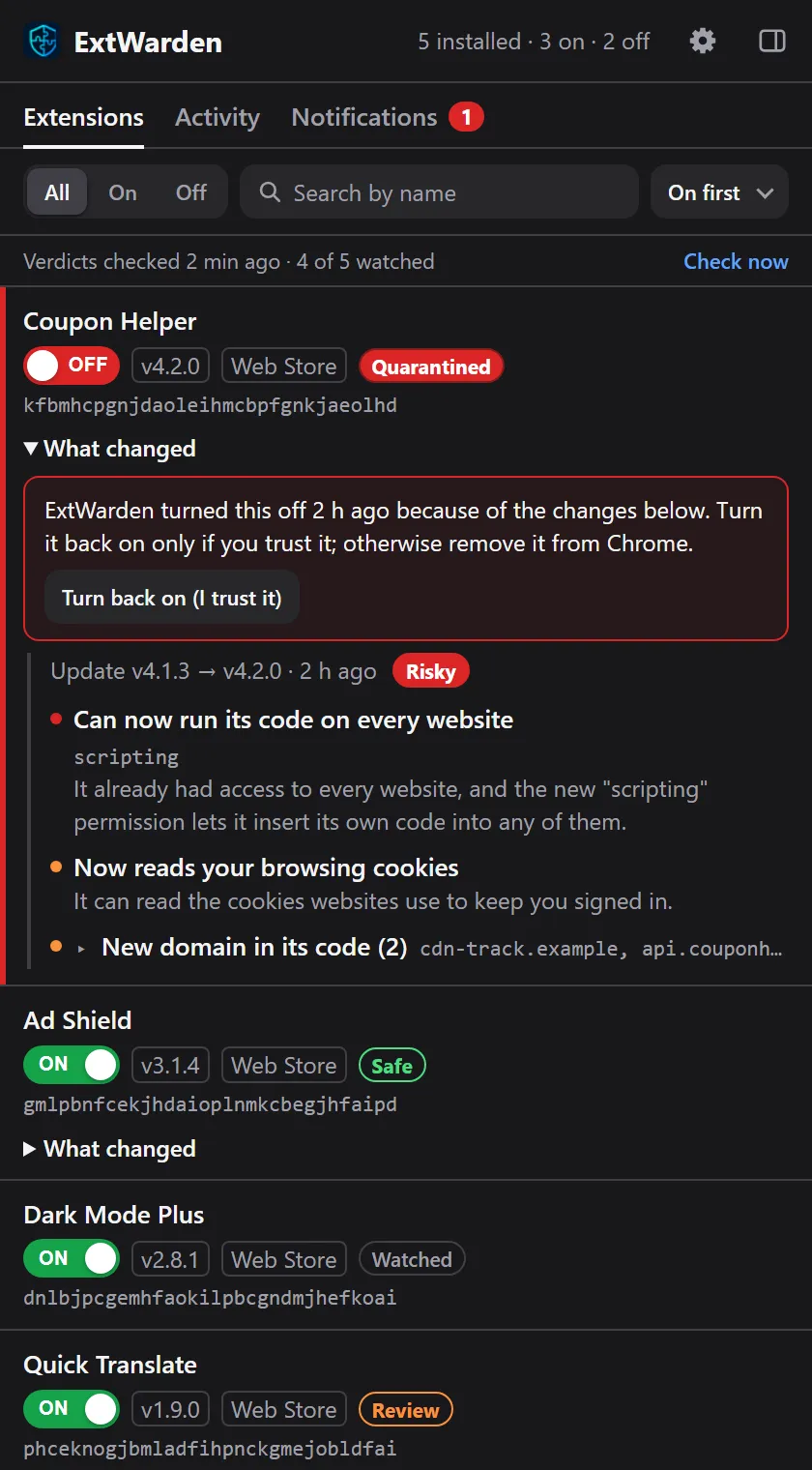
We download each new version of the extensions we watch and compare it with the previous one: permissions, websites it can touch, servers it talks to, its owner, and risky code.
- 2
New versions wait to be checked
When an update reaches your browser before we've checked it, ExtWarden keeps it off until we have. Usually that's a couple of hours at most.
- 3
Risky ones are stopped
If the update looks dangerous, the extension stays off and ExtWarden tells you why. One click turns it back on if you trust it.
What you get
Simple to use. Serious about safety.
You stay in control
Anything ExtWarden turns off comes back with one click. Choose how strict it is in Settings.
Auto-quarantine
Risky extensions are turned off right away. You decide if they come back.
Hold until checked
An update we haven't checked yet waits, usually within a couple of hours.
New-owner alerts
Know when an extension is sold or moves to a different developer.
Never miss an alert
Every alert is also kept inside ExtWarden, even with notifications off.
Private by design
Your extension list never leaves your browser. No account, no tracking.
Privacy
Your extensions stay your business.
ExtWarden never uploads your extension list. It downloads the same public file of verdicts as everyone else and checks your extensions against it on your own computer.
Read the privacy policy →- No account or sign-up
- No tracking, analytics or ads
- Your extension list stays on your device
- Open about every check we run
Questions
Why would a trusted extension turn bad?
Popular extensions get sold, and developer accounts get hacked. The new owner can ship a harmful update to every user at once, and Chrome installs it silently. ExtWarden checks those updates for you.
Does ExtWarden see which extensions I use?
No. ExtWarden downloads one public list of verdicts, the same file for everyone, and looks up your extensions on your own computer. Nothing about your extensions is sent anywhere.
What if ExtWarden flags something I trust?
You're always in control. One click turns it back on, and ExtWarden won't turn it off again for the same change. You can also switch off auto-quarantine in Settings.
Which browsers does it support?
Chrome first. Microsoft Edge is next, then Firefox.
How much does it cost?
ExtWarden is free while it's in beta.
Stop trusting updates blindly.
ExtWarden is coming to the Chrome Web Store. Free during the beta.